AirOps is one of the strongest tools for content teams that need to act on AI search visibility, not just measure it, but it only pays off if you publish or refresh content at real volume and you have someone on your team who owns the setup. It's best for in-house SEO and content teams at mid-size and large companies; solo bloggers and small teams will find it heavy and hard to budget.
AirOps is an AI search growth platform from a US startup founded in 2021. The content and AEO platform tracks how often ChatGPT, Gemini, Perplexity, and Google's AI features cite your brand, then uses AI workflows and an agent called Quill to brief, draft, refresh, and publish the content that closes those gaps. It is not a writing assistant you open for one blog post; it's closer to a content and SEO operations system with AI built in.
In recent times, AirOps has become increasingly valuable beyond content, SEO, and AEO professionals. Marketing teams across different functions, as well as sales, customer service, and product teams, are using AirOps to build playbooks and workflows that automate repetitive tasks, streamline operations, and help them work more efficiently at scale.
I’ve been using AirOps for about one year, and in this review, I’ll cover everything you need to know to decide if AirOps is for you.
AirOps review: key takeaways
- Verdict: I recommend AirOps with caveats for content teams that refresh or publish at volume and want to act on AI search data, not just watch it. I also recommend it for marketing-adjacent professionals who handle repetiive tasks.
- Plans: Solo (35,000 tasks a month, one user, ChatGPT insights only), Pro (100,000 tasks, unlimited seats, 7+ answer engines) and custom Enterprise. AirOps doesn't publish plan prices.
- Biggest 2026 launch: Quill, an AI agent that watches for stale pages and citation gaps and drafts fixes for human approval. Quill also makes it easier to build workflows to automate marketing tasks.
- AirOps has a relatively good review: 4.7/5 from 134 reviews on G2. Praise centers on time saved; complaints center on the learning curve, setup, and hard-to-predict costs.
- Skip it if you publish a handful of posts a month or only want a dashboard of AI visibility numbers.
How I Tested AirOps
Testing AirOps was relatively straightforward because I’ve been using the Pro plan for almost a year. In fact, my success story with Quill (opens in a new tab) was featured by AirOps around the time of its product launch.
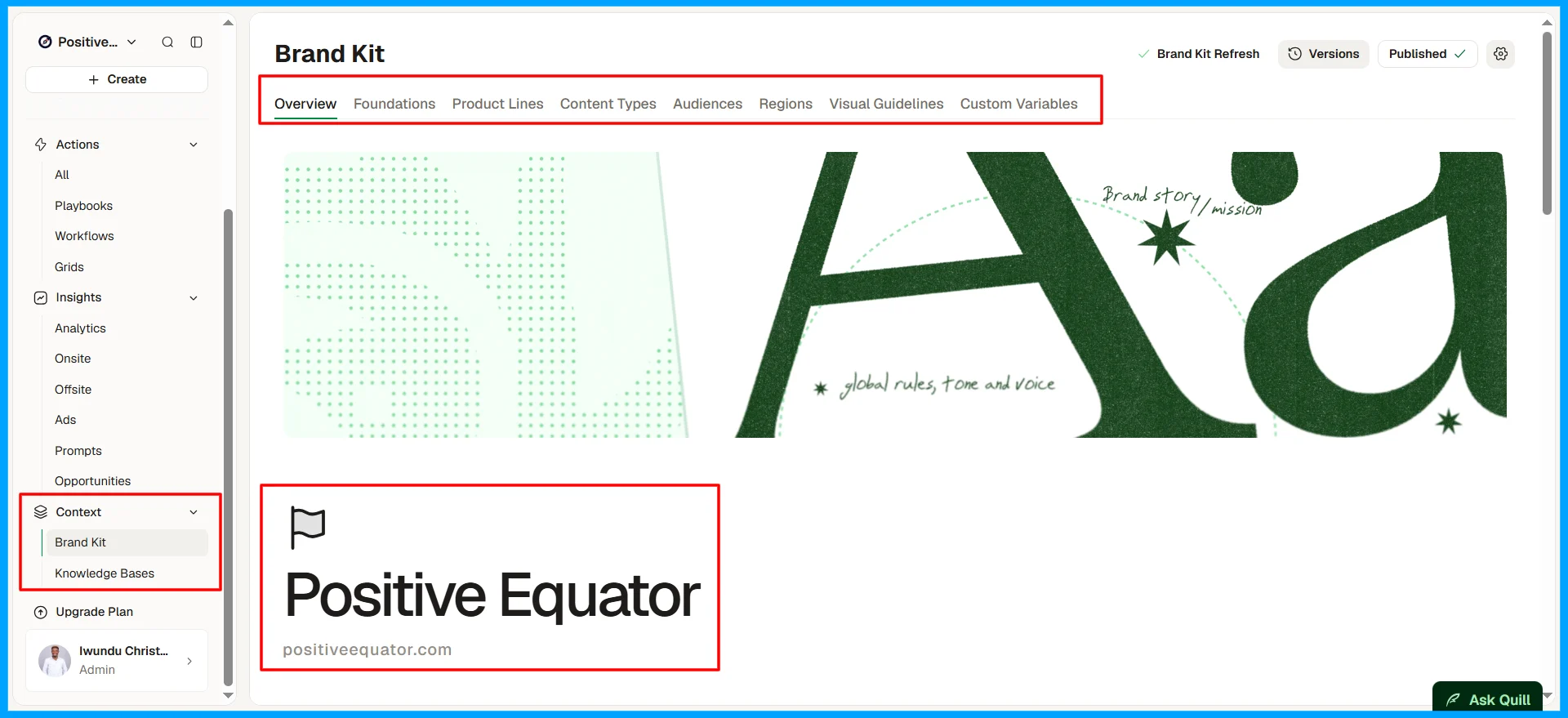
Beyond the accounts I’ve set up for clients, I also created a personal AirOps account for my brand, Positive Equator (opens in a new tab). I use it to manage my day-to-day content, SEO, and AEO activities.
Beyond my hands-on experience, I reviewed AirOps’ pricing page and help documentation, launch announcements and press releases, its research on AI search, G2 reviews, hands-on reviews from other paying customers, competitors’ critiques, interviews with CEO Alex Halliday, and independent coverage of its funding and product launches. I’ve listed the sources at the end of this review.
What is AirOps?
AirOps is a platform for winning visibility in AI search: it measures where answer engines cite you and your competitors, then helps your team produce and update the content that changes those answers. AirOps calls this "content engineering": building repeatable systems of models, data, and human review instead of relying on one-off prompts.
Fact | Detail |
|---|---|
Founded | 2022 by Alex Halliday (Co-Founder and CEO), Matt Hammel (Co-Founder and COO), and Berna Gonzalez (Co-Founder and CTO). |
Funding | $40M Series B led by Greylock (November 2025), bringing total funding to about $60M; earlier, a $15.5M Series A led by Unusual Ventures. |
Valuation | $225M at the Series B. |
Revenue | About $13M ARR in 2025 |
Customers named | Webflow, Klaviyo, Wiz, Kayak, Ramp, Chime, Carta, Rippling, and Asana. |
Answer engines tracked | ChatGPT, Gemini, Perplexity, Google AI Mode, Google AI Overviews, and Claude, depending on the plan |
Key features and how well they work
Insights and Page360: where you stand in AI search
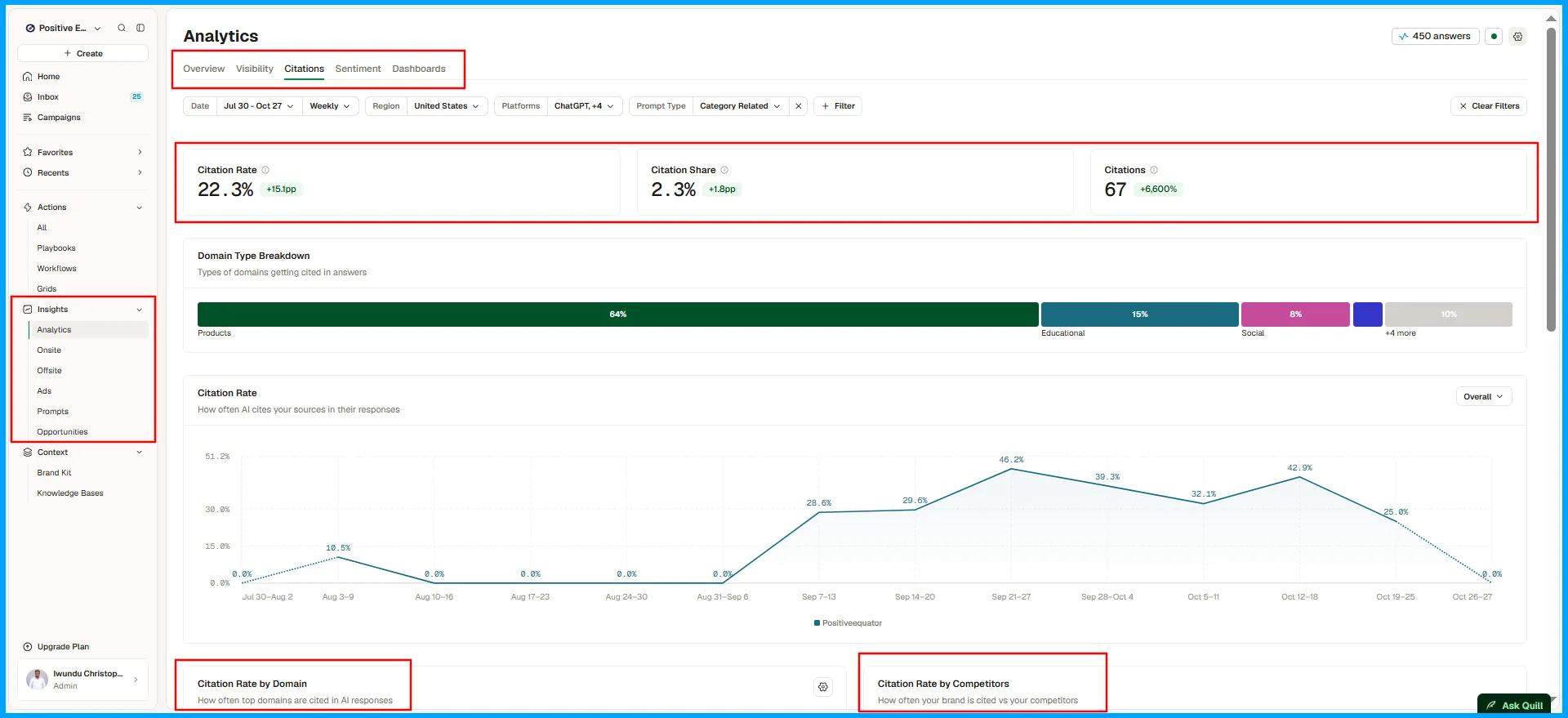
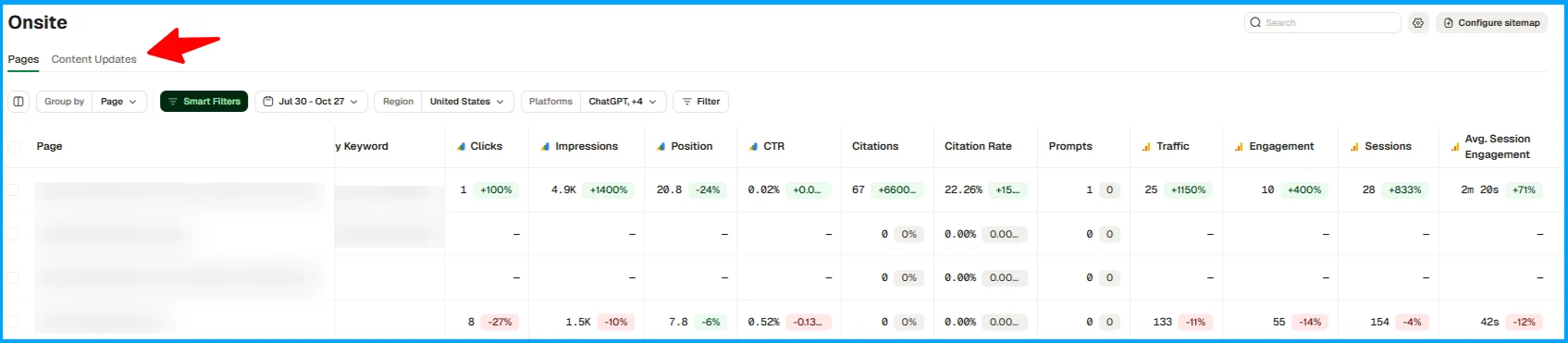
Insights shows how often answer engines mention and cite your brand for the prompts you track, how you compare with competitors, and which third-party sites (Reddit, YouTube, LinkedIn, and others) those engines lean on. Page360 adds Google Search Console and GA4 data (Onsite) to each page, so you can spot pages that rank in Google but never get cited, or pages losing clicks. You also get to connect your CMS (WordPress, Webflow, Shopify, etc.) to easily track and connect your content updates to their outcomes (Content Updates).
This 360-degree performance overview matters more than it sounds. According to The 2026 State of AI Search (opens in a new tab), only 30% of brands stayed visible from one AI answer to the next, and just 20% stayed present across five consecutive runs of the same prompt. A single manual check of your citations and/or mentions in ChatGPT or Perplexity tells you almost nothing; tracking across all AI answer platforms over time gives you better insights that can support your decision-making.
While AirOps Insights provides lots of insights into your content’s performance on AI answer engines, the data is relatively thin compared to some alternatives focused solely on AI visibility tracking.
If deep visibility analytics is your main goal, compare a dedicated tracker first. If not, evaluate whether other AirOps features outweigh what the platform lacks in analytics depth.
Note: Be careful when choosing a tool because your AI visibility tracker can quietly break your analytics and your strategy (opens in a new tab).
Workflows, Playbooks, Grids, Brand Kits, and Knowledge Bases: the engine room
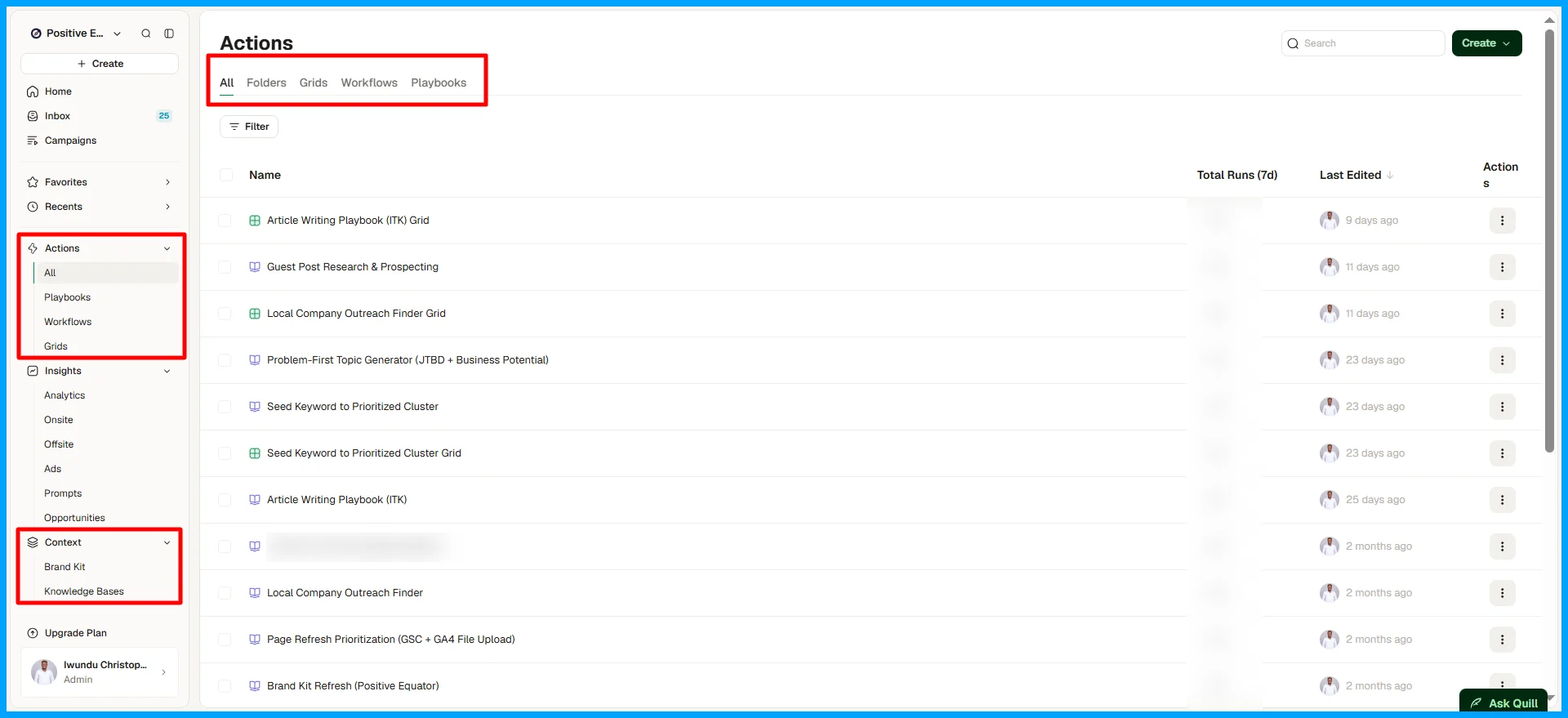
AirOps Workflows are multi-step AI pipelines you build using a drag-and-drop editor. They let you combine AI models, your Brand Kit (voice, positioning, style guide, and more), and Knowledge Bases (product documentation, research, and other relevant data) to create repeatable processes. AirOps supports a multi-model architecture featuring leading foundation models from major providers like OpenAI, Anthropic, Google, and Perplexity, giving you flexibility in how you build and run your workflows.
AirOps Workflows offers a wide range of tools and integrations across different categories, including web research, coding, AI prompting, transcription, workflow automation, data management, image and video generation, answer engine research, SEO research, B2B data enrichment, content processing, social media, content quality assessment, project management, CMS platforms, reviews, general research, content creation and refresh, content enhancement, keyword analysis, and answer engine optimization (AEO). You can also choose from various connectors and integrations to bring data and tools from other platforms into your workflows.
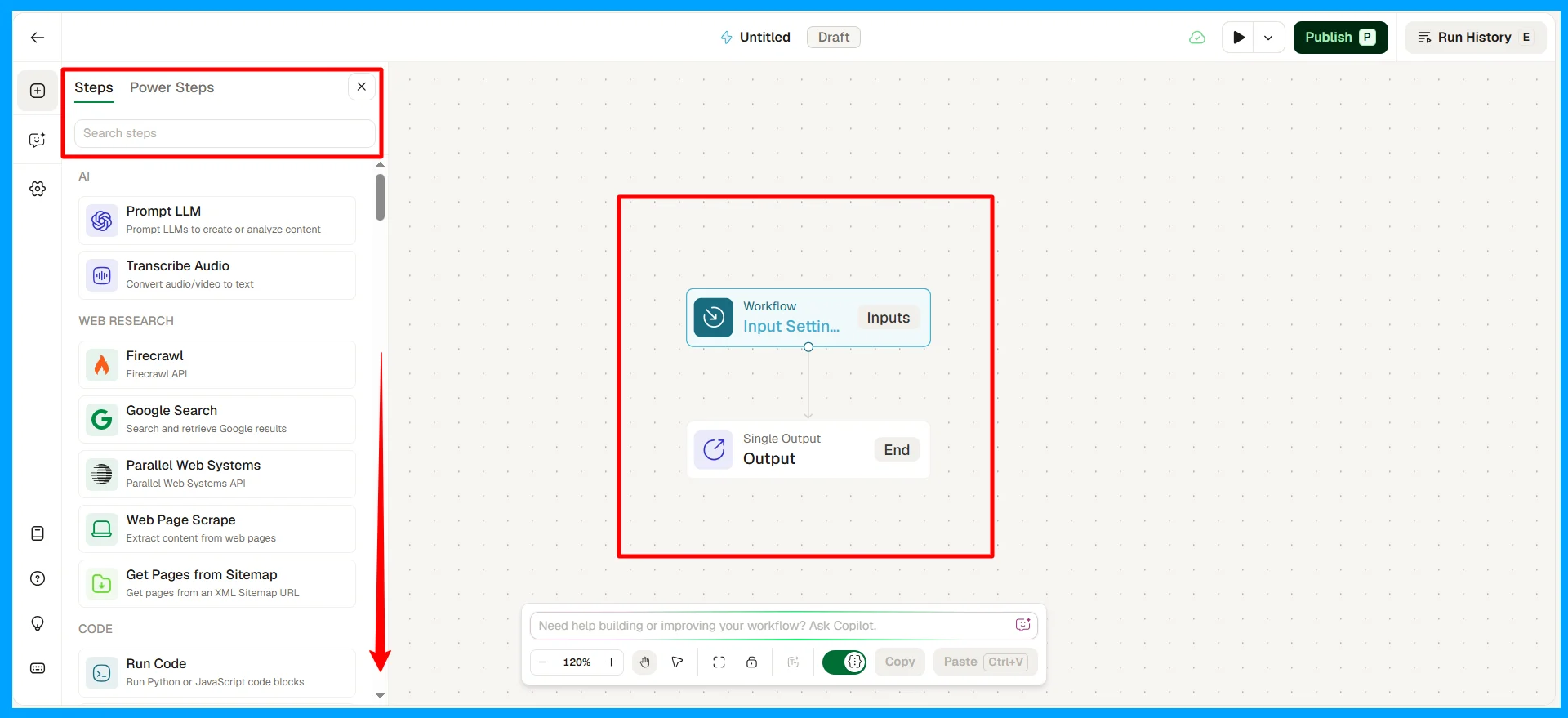
Playbooks take a more accessible and beginner-friendly approach to workflow creation. Instead of building every step manually, you can build from a template or prompt Quill, AirOps' AI agent, to help you create, edit, or improve workflows that handle specific tasks.
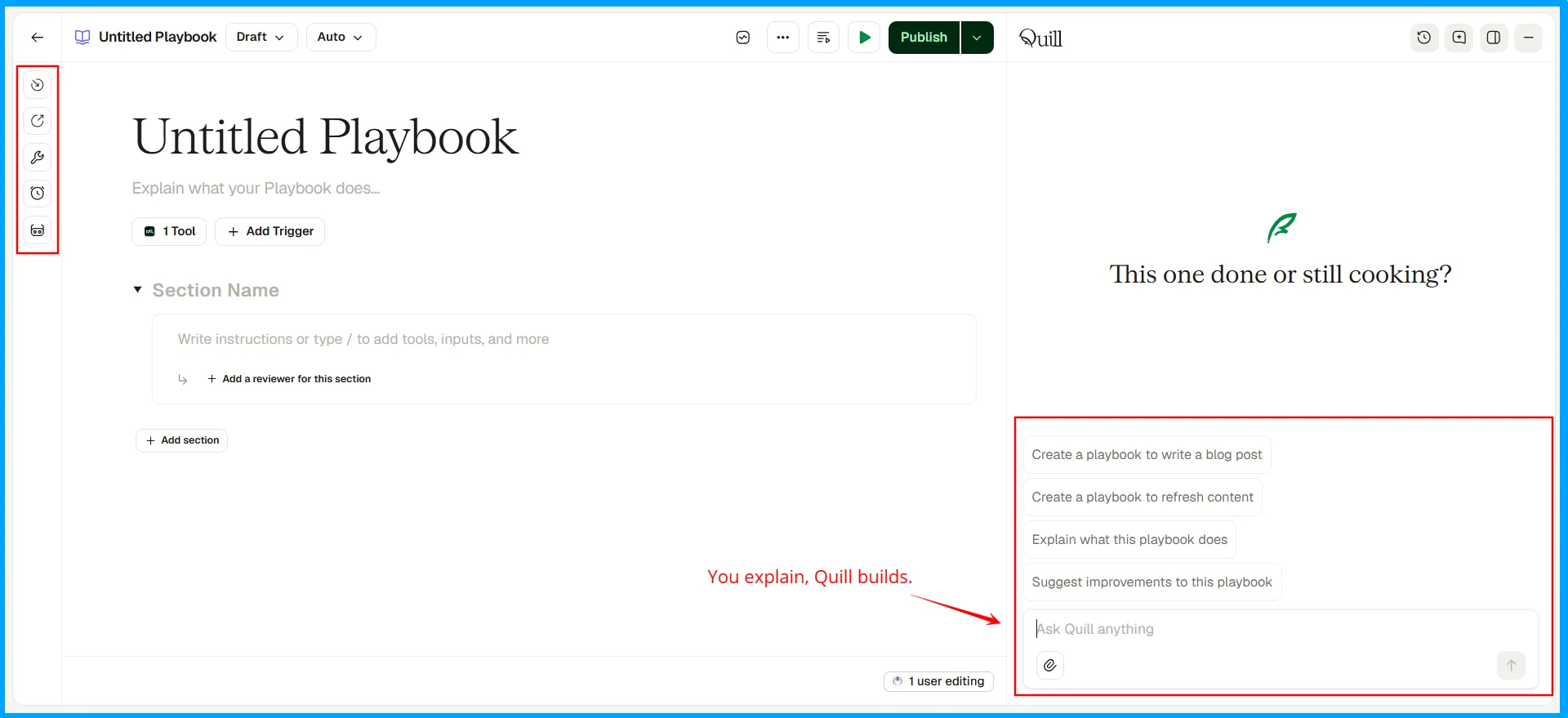
Grids take things a step further by letting you run a workflow across hundreds of rows at once. For example, instead of updating one page at a time, you can use Grids to refresh content across multiple pages at scale. You can run grids for both workflows and playbooks, and you’re able to create different grid sheets if you wish to separate the pages by categories or websites. You also have the option of uploading/importing or exporting CSV files at will. Another thing I love about Grids is that you can write to Grid from your connected Claude account and have the data set up and waiting for your approval inside AirOps.
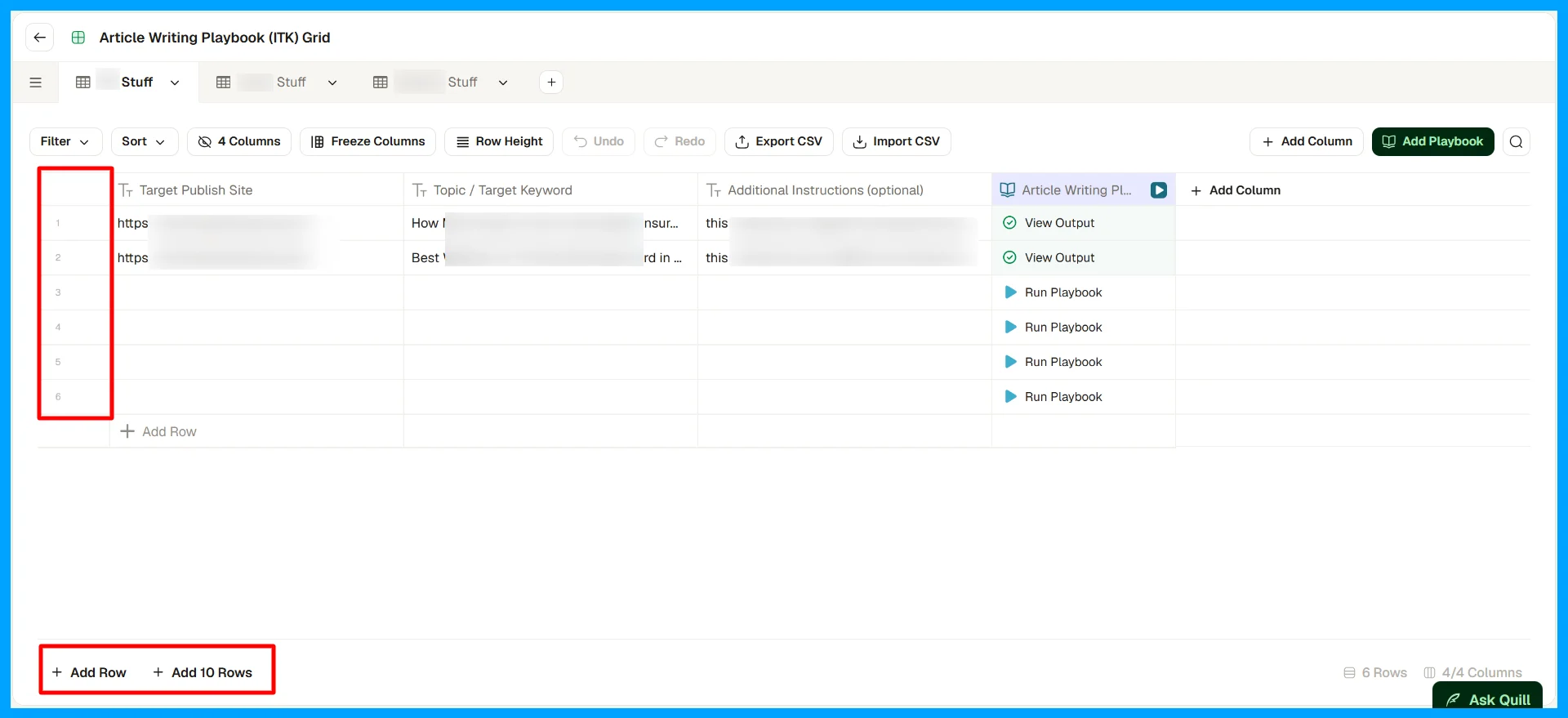
Workflows, Playbooks, and Grids are my favorite AirOps features for a reason. Workflows and Playbooks help you turn repetitive SEO and content tasks into automated systems and processes, while Grids makes it easier to execute those processes at scale.
However, there's something worth understanding before you dive in: the quality of your output depends heavily on the context you provide. This is where your Brand Kit and Knowledge Base come in.
Your Brand Kit is where you define how your brand communicates, including its voice, positioning, tone, author persona, products, content types, target audiences, and overall editorial and branding style guidelines. The goal is to give AirOps the context it needs to produce work that sounds like your brand rather than generic AI-generated content.

Your Knowledge Base (KB), on the other hand, holds the information that makes your outputs more relevant and grounded. This could include your sitemap, product documentation, customer feedback, research reports, and other resources that help AirOps understand your business, audience, and subject matter. You can create/write, read/extract, and/or modify your different KB files from a workflow, playbook, or your connected Claude account. You can add data to your KB through uploads, webpage links, sitemaps, and imports from your Google Drive, etc.
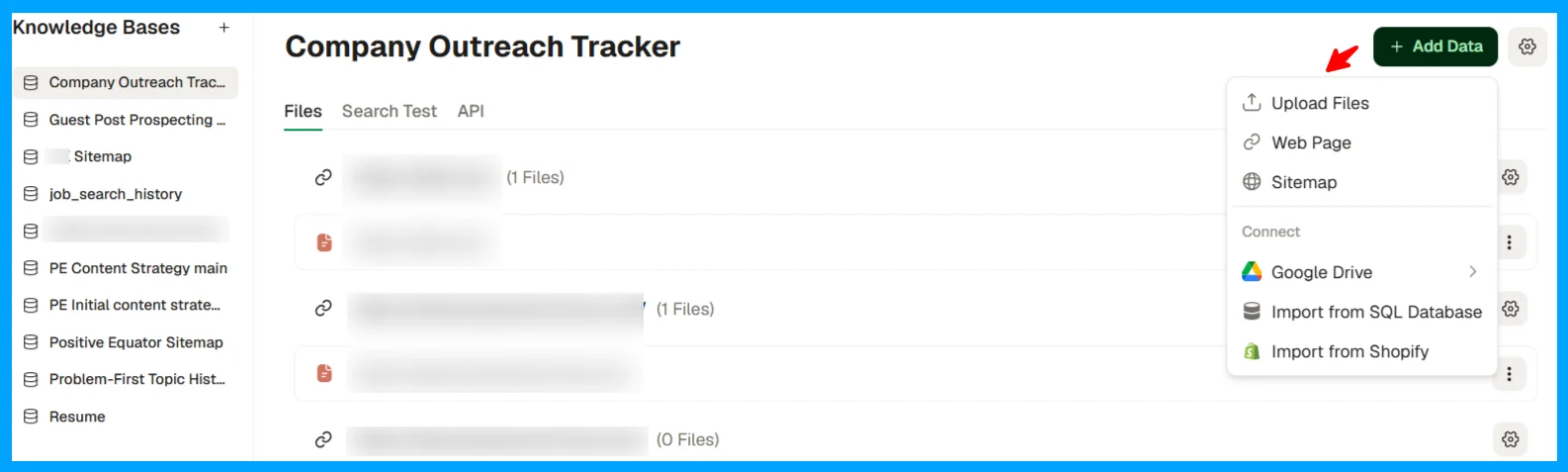
These features sound too good to be true, but getting them right is where things can become challenging. There's a real learning curve to using AirOps, and if you skip the foundational setup or rush through it, even a powerful workflow can produce disappointing results. That’s understandable, considering you can build an entire marketing operations system inside AirOps.
AirOps CEO, Alex Halliday, discussed the company's three-to-four-week customer onboarding process on the Humans of Martech podcast (opens in a new tab) in May 2026. That gives you an idea of the learning and setup involved in getting the most out of the platform.
Recognizing this need, AirOps launched AirOps University (opens in a new tab), which provides free training to help users learn the platform and apply it to their work. Participants graduate as content engineers.
I recommend you invest time in learning the platform, setting up your context, and understanding how its features fit into your operations. That's when your team will start getting the real value; reason I mentioned the need to have an AirOps expert on your team.
Quill: the AI agent captain
Quill is AirOps’ primary AI agent, often described as the platform’s “agent captain.” It operates within AirOps to help users execute a range of intelligent tasks. Its core purpose is to bridge the gap between the AI search insights AirOps provides and the scalable execution needed to act on them.
Some of the functions Quill can help you perform within AirOps include:
- Generating & refreshing content: Quill powers your workflows and playbooks, helping you draft 80%-ready content from briefs. It can also help identify underperforming or outdated pages, assess how well your content is optimized for search engines and answer engines, and draft updates designed to improve rankings and earn citations. You can then review and approve the proposed changes before they go live.
- Third-party citations: Quill can also help you identify opportunities to improve your brand's presence across third-party websites. It scans external sites, forums, and directories to find outdated or inaccurate information about your brand and reports potential opportunities for correction.
- Identifying growth and optimization opportunities: Quill monitors your Insights data to surface high-impact opportunities, such as competitor content gaps and valuable search prompts where your brand should appear but currently isn't being cited. These insights help you identify where to focus your optimization efforts.
- Creating and optimizing automated workflows and Playbooks: As I showed you in the section on Playbooks, Quill makes workflow creation more conversational. It acts as an interactive assistant, helping you translate your desired outcomes into workflows and playbooks by recommending the necessary steps, components, and refinements. Instead of manually configuring everything from scratch, you can explain what you want to achieve and let Quill guide the process.
- Enforcing context: When executing writing or editing workflows, Quill draws on the guidelines in your Brand Kit and Knowledge Bases. This helps ensure your outputs align with your preferred tone of voice, writing rules, brand positioning, and core business messaging.
- Iterative learning: One thing I particularly like about Quill is its iterative approach to improvement. Through human feedback, refinements, and line edits, you can help it produce better outputs over time. Connecting relevant data sources also gives your workflows access to more business-specific context, helping you generate outputs that are more relevant to your needs.
Offsite: Getting cited on other people's sites
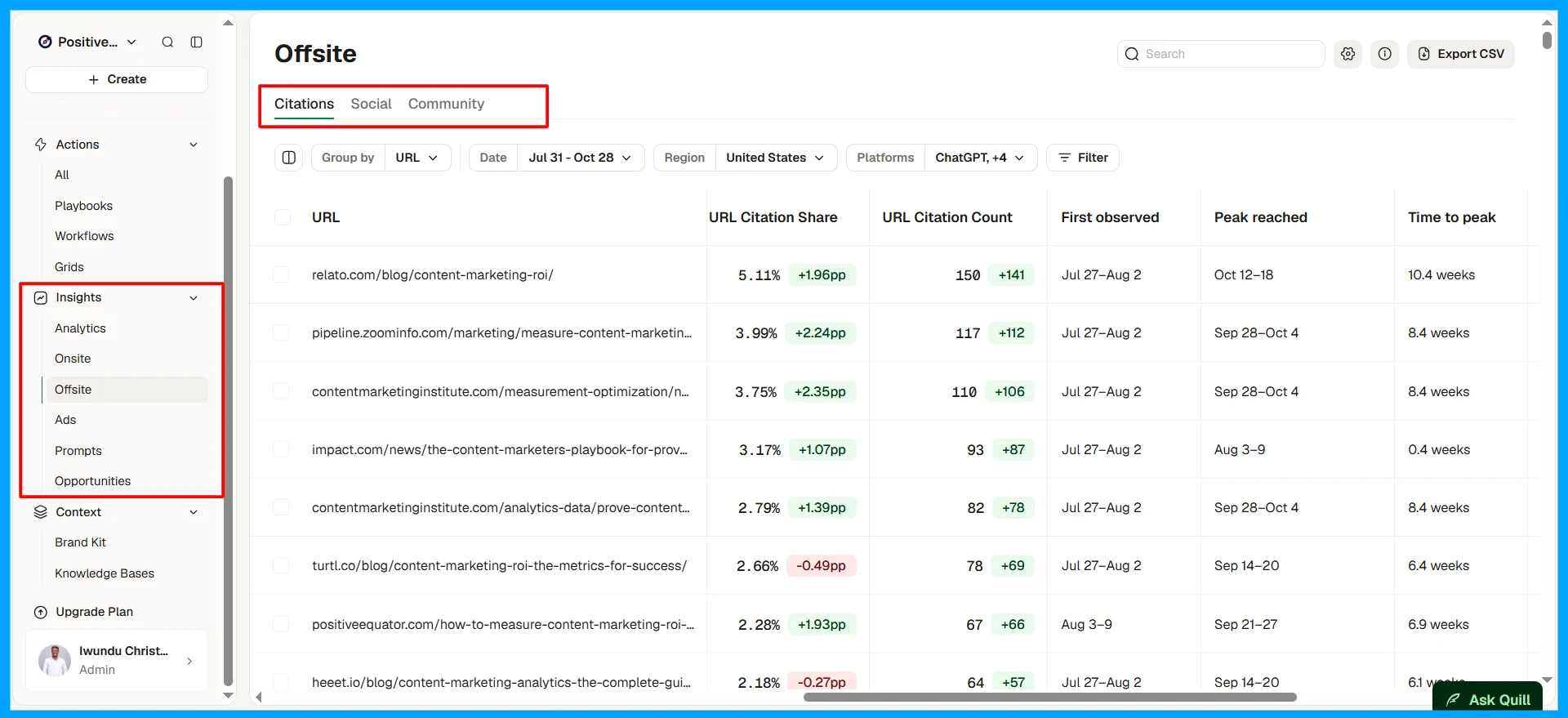
AirOps Offsite helps you surface third-party websites, social media posts, and community threads that answer engines pull from that you can pitch to and earn mentions on their sites. It ranks publishers with a proprietary "Influence Score," manages outreach inside AirOps, and measures the visibility lift from each placement. Besides the Influence Score, the platform provides tons of other data to help you decide on third-party sites to prioritize.
A feature like this is super relevant because up to 85% of brand discovery (opens in a new tab) in AI search comes from third-party content.
I published a recent article on how brands can approach GEO for social media (opens in a new tab) as a way of improving their chances of answer engine citations.
Integrations, MCP connectors, and the Claude connector
AirOps integrates with lots of applications, including CMS platforms like WordPress, Webflow, Contentful, and Sanity. The AI visibility platform also connects to Google Search Console and GA4, making it easy for you to pull your data from both platforms.
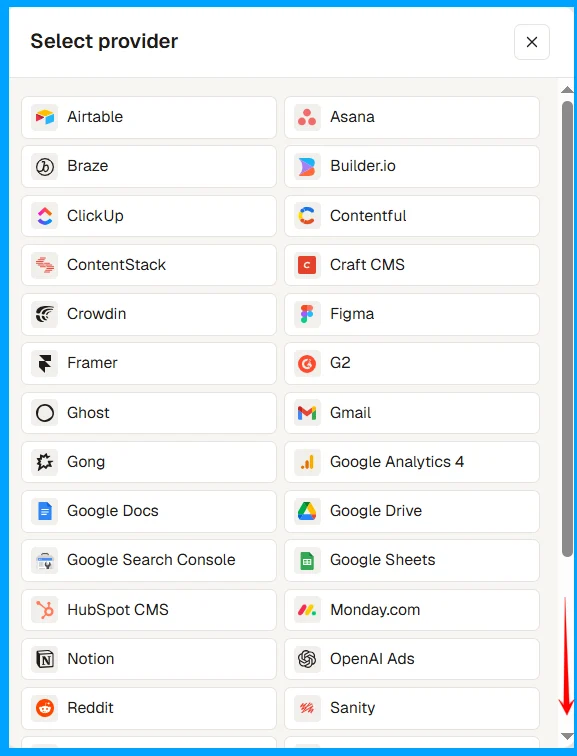
AirOps also offers an Insights API and an MCP server. You can connect to other applications via an MCP. The Claude connector, for instance, lets you ask Claude about your AirOps visibility data and use your Brand Kit, Knowledge Base, and a number of other data points right inside your Claude account.
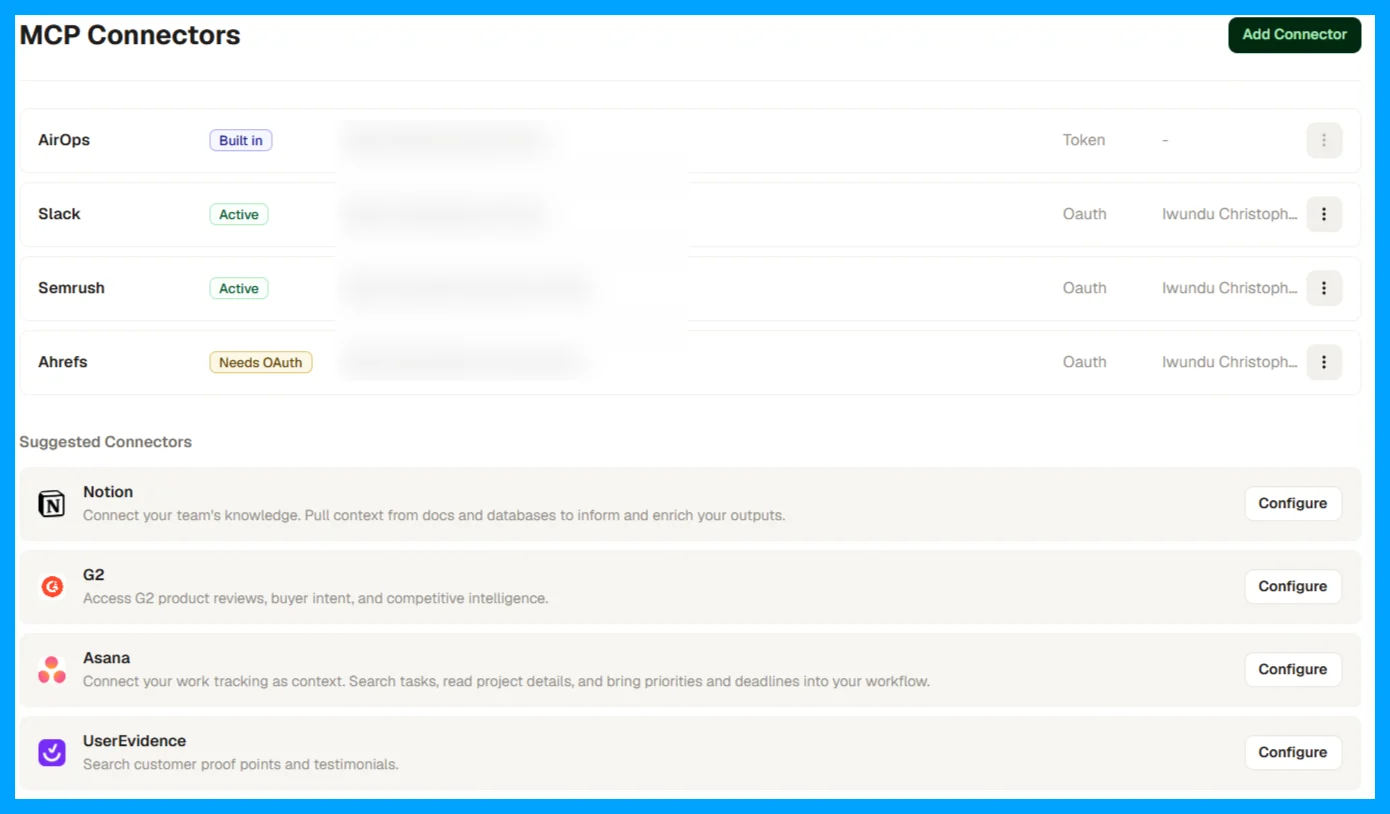
Note that lower plans get fewer integrations. Check the pricing page for what’s included in each plan. If you want to connect a custom application, you can reach out to AirOps to find out the possibilities. There is a very active AirOps Builders Slack community where you can interact with both AirOps and fellow builders.
AirOps pros and cons
AirOps: pros and cons
Pros
- Pro: Connects AI visibility data to action: Insights and Page360 find the gaps, and workflows, playbooks, grids and Quill fix them
- Pro: Grids helps you run automations at scaling, making it possible for you to write or refresh hundreds of pages with one workflow.
- Pro: Quill makes end-to-end use of the platform easier. Superintelligence at your fingertips at no extra cost.
- Pro: Brand Kits and Knowledge Bases keep AI drafts on-brand and grounded in your own material
- Pro: Publishes straight to WordPress, Webflow, Contentful and Sanity, and has integrations and connectors to any application you use.
- Pro: Relatively high positive sentiment: 4.7/5 on G2 from 134 reviews, with no reviews below three stars
Cons
- Con: No published prices. But you get up to 14-days free trial when you sign up.
- Con: Solo Plan tracks ChatGPT only; Google AI Overviews and Perplexity data need Pro
- Con: Steep learning curve. It takes time to learn and understanding how to maximize your use of AirOps
- Con: Task-based billing is hard to forecast before you've run your own workflows
- Con: Large grids can run slow
- Con: An overkill for teams that publish or refresh only a few pieces a month
What's new on AirOps in 2026
AirOps shipped its biggest changes in the first half of 2026, specifically at its inaugural AirOps Next event on May 13th 2026. Here is a timeline of AirOps' latest updates.
When | Launch or change |
|---|---|
November 2025 | $40M Series B led by Greylock |
January 27th 2026 | Page360 shipped |
February, 2026 | AirOps connector for Claude (MCP), bringing Insights, Brand Kits, and workflows into Claude |
February 3, 2026 | Offsite shipped |
May 13, 2026 | Quill launched at AirOps Next in New York |
May 27th, 2026 | Relaunch of AirOps University |
AirOps pricing: what each plan includes
AirOps sells three plans, Solo, Pro, and Enterprise, priced around tasks (the credits you spend each time AirOps generates content or extracts data). There is no published official AirOps pricing, but you get to see the price per plan when you sign up for a 14-day free trial account.
Solo | Pro | Enterprise | |
|---|---|---|---|
Tasks per month | 35,000 | 100,000 | Custom |
Users | 1 | Unlimited | Unlimited |
Brand Kits | 1 | 1 | Unlimited |
Knowledge Bases | 3 | 5 | Unlimited |
AI visibility (Insights) | ChatGPT only | 7+ answer engines | 7+ engines, custom prompt and page limits |
Integrations | Basic CMS and SEO | CMS, SEO, AEO, social, and project tools | Custom agent builds, your own model API keys |
Support | Community and live chat | Community and live chat | Dedicated account manager, 1:1 onboarding, a forward-deployed engineer |
Price | $200, but you can start with a free trial | $2000, but you can start with a free trial | You contact AirOps for a custom setup and pricing. |
What I'd want you to know before signing up:
- The Solo plan only tracks ChatGPT. If your audience finds you through Google's AI Overviews or Perplexity, you need Pro for the visibility data.
- The trial shows you more than Solo includes. The 14-day free trial (no card required) gives you access to more features. If you don’t plan on continuing with Pro, note the features you rely on during the trial, because some may not survive the downgrade.
- AirOps is billed monthly.
Is AirOps worth it?
AirOps is worth it if you run real content volume and have someone who will own the setup; it might not be worth it if you’re a small team that publishes occasionally.
The cost math works best at scale. A team refreshing 300 pages a quarter or drawing insights from hundreds of customer feedback docs gets value for their money. On the other hand, a team publishing 10 to 20 pieces a month would struggle to justify the cost.
What real users say about AirOps
User opinion of AirOps is strongly positive on outcomes and consistently critical of the learning curve and pricing clarity.
Platform | Rating | Notes |
|---|---|---|
G2 | 4.7 / 5 | 134 reviews; 82% five-star, 15% four-star, none below three stars as of October 2026. |
Capterra | No meaningful presence found | N/A |
Trustpilot | No rating found | N/A |
Product Hunt | No rating found | N/A |
I took my time to review and analyze what people are saying about AirOps on G2, where they have a strong presence, and here are my deductions.
What people praise:
- Time saved on research and drafting. AirOps compresses research-to-draft work into a single session. Days and hours of work can be cut down to 20-30 minutes of workflow run, with the output being about 80% ready.
- Refreshing at scale. Users praise Grids for helping them update hundreds of pages with one workflow.
- On-brand output. Reviewers credit Brand Kits with keeping drafts in the company's voice, which is essential when generating content with AI.
What people complain about:
- The learning curve. I noticed this was the most common theme found in almost half of the reviews. I can relate to this because I felt the same before I learned how to use AirOps optimally,
- Pricing. Some users acknowledge the possibilities AirOps bring but think it can be expensive especially for a small team on a budget.
My takeaway
My takeaway here is that the complaints are about cost and effort to learn how to use the platform, not about whether AirOps works. Here is what I advise intending users who ask me: Sign up for AirOps University and take advantage of the free trial to get familiar with the product within a week of honest work. Test everything you need to test regarding workflows, playbooks, insights, task usage, Grids run volume, etc., and decide if it’s worth it for your team.
AirOps vs. the alternatives
AirOps' main rivals are split into AI visibility trackers and AI writing tools, and the right choice depends on whether you need only AI visibility data, content production and management, or both.
If you | Consider |
|---|---|
Need to measure and fix AI visibility across a large content library | AirOps |
Mainly want deep AI visibility analytics and reporting | An alternative like Profound, then decide whether you need production tools |
Want lightweight AI visibility tracking on a small budget | Peec AI or Pallix AI should work for you. |
Already pay for an SEO suite and only need basic AI visibility data | Semrush or Ahrefs |
Publish a few posts a month | A general AI assistant plus a written refresh checklist |
Who should use AirOps?
Verdict: AirOps
Recommended with caveatsAirOps is one of the most complete platforms for turning AI search visibility data into published content: it finds the pages and prompts you're losing, drafts the fixes on-brand, and refreshes content at a scale no small team can match by hand. It earns its cost only at volume, and the learning curve and unclear pricing mean you should budget days of setup and get the price sorted out first.
- Best for
- In-house SEO and content teams at mid-size and large companies that refresh or publish dozens of pages a month and want AI search data and production in one place
- Avoid if
- You publish a few posts a month, have nobody to own workflow setup, or only want a dashboard of AI visibility numbers
Choose AirOps if you manage a large content library, you're already losing clicks to AI answers, and you have a content engineer or SEO lead who can own the workflows. Pro is the realistic starting plan because Solo's ChatGPT-only visibility data leaves out Google's AI features and other features you’d need.
Choose something lighter if you mostly need to see where you stand in AI answers, or if you publish occasionally and a good AI assistant plus a refresh routine would cover you.
Frequently asked questions about AirOps
What is AirOps used for?
AirOps is used to grow visibility in AI search. It tracks how often ChatGPT, Gemini, Perplexity and Google's AI features cite your brand, then uses AI workflows and its Quill agent to brief, draft, refresh and publish the content that closes the gaps.
How much does AirOps cost?
AirOps doesn't publish plan prices publicly. However, its pricing page lists Solo (35,000 tasks a month, one user), Pro (100,000 tasks, unlimited seats), and custom Enterprise. On investigation, I found the Solo starts at $200 a month, and Pro starts at $2,000 a month.
Does AirOps have a free trial?
Yes. AirOps offers a 14-day free trial with no payment details required, plus 50,000 free credits for testing in the workflow builder. The trial ends after 14 days, when your tasks run out, or when you upgrade.
What is AirOps Quill?
Quill is the AI agent and "agent captain" built by AirOps. It helps marketing and content teams move from data and insights to live execution across the AirOps platform. It monitors for stale pages, competitor gaps, and prompts where your brand isn't cited, then proposes fixes and drafts in an Inbox for your team to approve.
Which AI search engines does AirOps track?
AirOps tracks ChatGPT, Gemini, Perplexity, Google AI Mode, and Google AI Overviews on the Pro plan. Higher plans cover 7+ answer engines.
What is a task in AirOps?
A task is the credit AirOps uses each time it completes an action, such as generating content or extracting data. Tasks reset to your plan's allowance at the start of each calendar month.
Is AirOps hard to learn?
Yes, for most teams. The learning curve is the most common complaint in G2 reviews. AirOps launched AirOps University, a free platform that helps users learn how to use AirOps effectively in about 1-2 weeks.
Is AirOps good for small businesses?
Usually not. AirOps pays off when a team publishes or refreshes content at volume and someone owns the workflow setup. If you publish a few posts a month, a general AI assistant and a written refresh routine will cost far less.
What are the best AirOps alternatives?
For AI visibility analytics, Profound is the closest rival, and Peec AI is a lighter, cheaper AI visibility tracker. If you already use Semrush or Ahrefs, their AI visibility features may cover basic needs too.
Sources
- AirOps: Pricing (opens in a new tab) (checked October 24, 2026)
- AirOps Answers (opens in a new tab) (checked October 24, 2026)
- AirOps: The Next Chapter for AirOps (Quill launch) (opens in a new tab) (May 13, 2026)
- Business Wire: AirOps Launches Quill (opens in a new tab) (May 13, 2026)
- AirOps: What 250+ Marketing Leaders Learned at AirOps Next 2026 (opens in a new tab) (May 20, 2026)
- AirOps: Webinar recap, What's New at AirOps and Quill (opens in a new tab) (May 27, 2026)
- Business Wire: AirOps Launches Offsite (opens in a new tab) (February 3, 2026)
- AirOps University: Using Page 360 to understand your onsite gaps (opens in a new tab)
- AirOps Docs: MCP server (opens in a new tab) and AirOps: Claude connector (opens in a new tab)
- AirOps: The 2026 State of AI Search (opens in a new tab) (December 2, 2025)
- AirOps: Webflow case study (opens in a new tab)
- TheSaaSNews: AirOps raises $40 million in Series B (opens in a new tab) (November 2025)
- Sacra: AirOps revenue, funding and growth (opens in a new tab)
- G2: AirOps reviews (opens in a new tab) (checked October 24, 2026)
- Humans of Martech #220: Alex Halliday on content engineering systems (opens in a new tab) (May 19, 2026)
- The Room Podcast: Alex Halliday on content engineering and the AI marketing stack (opens in a new tab) (2026)